An old, closed, or compromised checking account should not remain connected to a payment app longer than necessary. When I update financial information, I first check for transactions that may still depend on the existing account. Learning how to remove a bank account from Venmo safely can help prevent failed transfers, payment interruptions, and unauthorized access.
Venmo primarily serves customers in the United States, so its bank connections typically involve eligible US checking or savings accounts. Removing one is usually straightforward, but pending transfers, merchant connections, and backup payment settings can complicate the process.
What Should You Do Before Removing a Bank From Venmo?
Open your Venmo transaction history and review all recent payments and bank transfers. If a deposit or withdrawal is still pending, wait for it to finish whenever possible. Removing the bank does not automatically cancel a transaction that Venmo has already authorized. This careful approach is similar to learning how to stop OneDrive from syncing specific folders, where changing a connection does not necessarily reverse an action already in progress.
If you recently transferred money from your Venmo balance to the bank, confirm that the funds have arrived. Some standard transfers may offer a brief cancellation option while they remain pending, but availability depends on the transfer status.
Next, decide how you plan to use Venmo afterward. Add and verify a new bank account, debit card, or credit card if you want to continue sending money or making purchases. A replacement method is not universally required simply to unlink a bank, although a connected business or balance-funded purchase may need a preferred or backup payment method.
I also recommend checking the bank name and final account digits before making changes. This simple review helps prevent accidentally deleting the wrong funding source.
How Do You Remove a Bank Account From the Venmo App?
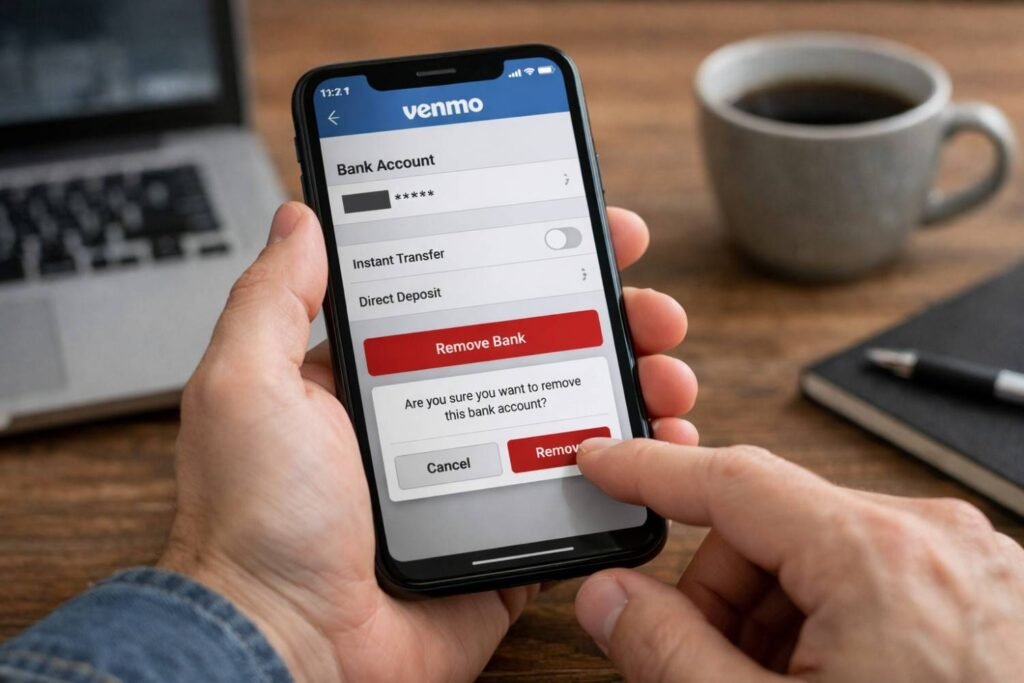
Open the official Venmo app and tap your profile picture or the Me tab. Find the Wallet section, where Venmo displays your linked banks and cards. Depending on your app version, the same information may appear under Banks and Cards or Payment Methods.
Select the bank account you want to delete. Review the displayed bank name and last four digits, then tap Remove or Remove Bank near the bottom of the screen. Confirm your decision when Venmo displays the confirmation prompt.
Return to the Wallet after completing the process. The deleted bank should no longer appear as an available funding source or transfer destination. If it remains visible, close and reopen the app before trying again.
Venmo’s menu names may change as the app receives updates. However, linked bank accounts should remain accessible through the Me tab and Wallet area. Update the app through the Apple App Store or Google Play Store if your screen looks significantly different.
Can You Unlink a Venmo Bank Account on a Computer?
Some Venmo account-management features are available through its official website. Sign in directly at Venmo.com, open your account settings, and look for your linked payment methods.
The website may not provide every control available in the mobile app. If you can view the bank but cannot remove it, use the latest Venmo app instead. Never enter your Venmo credentials on an unofficial website that promises to disconnect the bank for you.
Why Won’t Venmo Let You Remove Your Bank Account?
The Remove option may be missing when the bank is still associated with another account setting. Before assuming the app is malfunctioning, review connected merchants, backup payments, and processing transfers.
Is the Bank Linked to a Connected Business?
Delivery services, online retailers, charities, and other merchants can connect to a Venmo profile. The old bank may remain selected as the preferred payment method for one of these businesses.
Open the Me tab, tap the Settings gear, and select Connected Businesses. Choose the relevant merchant and change its preferred payment method. If you no longer use that service, remove its Venmo connection when the option is available. Then return to the Wallet and attempt to delete the bank again.
Is a Payment or Transfer Still Pending?

Venmo generally does not allow users to change the funding source after sending a payment. Unlinking the account also does not reverse completed transactions or stop every processing withdrawal.
Open the transaction details to identify its status. If a bank-funded payment is still processing, contact your financial institution for guidance. For eligible pending bank transfers, check whether Venmo displays a cancellation option. Avoid initiating another transfer until you understand what happened to the first one.
Is the Bank Set as a Backup Payment Method?
A Venmo balance may need an eligible backup method for certain purchases. Open Settings and review the Backup Payment section. If the old bank appears there, replace it with another eligible bank or card.
After updating the backup method, return to your Wallet and retry the removal. This also helps prevent future purchases from drawing money from an account you no longer use.
Is the Venmo App Outdated?
Install any available app update, close Venmo, and reopen it. Android users may also clear the app cache if the interface fails to refresh. Avoid clearing all app data unless you know your password and can complete Venmo’s identity-verification process.
If the removal option still does not appear, contact Venmo through Me, Settings, Get Help, and Chat With Us. Use official support instead of sharing account details with an unknown third-party technician.
How Can You Protect Your Account During Removal?

Use a trusted home Wi-Fi connection or cellular data when modifying financial information. Avoid public networks in airports, hotels, coffee shops, or shopping centers because they may expose your activity to unnecessary security risks.
Enable Face ID, Touch ID, biometric unlock, or an app passcode in Venmo’s security settings. Use a unique password for Venmo and protect the associated email account with multifactor authentication.
Never provide a password or one-time security code to someone claiming to represent Venmo. If you receive a suspicious message, do not open its links. Access support through the official app or type Venmo’s web address directly into your browser.
After unlinking the account, check your official bank statement rather than relying exclusively on app notifications. Look for unfamiliar Venmo transactions and confirm that no unexpected withdrawals remain pending.
What Should You Do If You Notice Unauthorized Activity?
Removing a bank is not enough when fraud may have occurred. Contact Venmo Support and your bank immediately. Your financial institution may recommend monitoring the account, restricting electronic withdrawals, filing a dispute, or replacing the account number.
Change your Venmo password and secure your email account. Review connected devices, merchants, cards, and banks for changes you did not make. Keep records of transaction dates, amounts, confirmation emails, and conversations with support.
Frequently Asked Questions (FAQs)
1. Can You Remove Your Only Bank Account From Venmo?
You may be able to remove your only bank, but some purchases or connected services may require another eligible payment method. Add a verified replacement first if you plan to continue using Venmo regularly.
2. Does Removing a Bank Cancel Pending Venmo Transactions?
No. Removing the funding source does not automatically cancel authorized, pending, or completed transactions. Review each transaction and contact Venmo or your bank when necessary.
3. Why Does the Deleted Bank Still Appear in Your Wallet?
The app may need to refresh, or the bank may remain connected to a merchant or backup payment setting. Update the app, check those connections, and contact official support if the account remains visible.
4. What Is the Best Way to Learn How to Remove a Bank Account From Venmo Safely?
Confirm that transfers have cleared, add a replacement method when needed, update connected businesses, unlink the bank through Wallet, and review your statement afterward.
Final Thoughts
I treat payment-method removal as a financial-security process, not simply an app adjustment. I verify pending activity, protect my connection, confirm the correct account digits, and monitor the bank after removal. These precautions reduce the risk of interrupted transfers and unnoticed transactions while keeping my Venmo payment settings current.